万籁俱寂,万字将成。
刘耀文
Stay hungry. Stay foolish.
© 2024-2026
Powered by Mix Space&
余白 / Yohaku
.
正在被0人看爆
关于
关于本站关于我
更多
时间线友链
联系
写留言发邮件 ↗
刘耀文
Stay hungry. Stay foolish.
链接
关于本站·关于我·时间线·友链·写留言·发邮件
© 2024-2026 Powered by Mix Space&
余白 / Yohaku
.
正在被0人看爆
赣ICP备2024031666号
RSS 订阅·站点地图·
··|
RSS 订阅·站点地图·|··|赣ICP备2024031666号
稍候片刻,月出文自明。

Claude 风格的流式 UI,到底是怎么做出来的

(已编辑)
4
辅助写作
AI·GEN

关键洞察

Claude 风格的流式 UI,到底是怎么做出来的

  • Loading...
  • Loading...
  • Loading...
  • Loading...
  • Loading...
  • claude 最近更新了交互是 UI,可以在聊天框流式输出可交互的页面 claude:
    同时看到一个叫 Generative-UI-MCP 的项目,作者的想法很直接:用 MCP 协议把 Claude 能生成可交互 UI 这套东西复刻出来。

    这个项目本身不复杂,但它把一件平时很难说清楚的事拆开了:Claude 这种交互式 UI,真正新在哪里;它为什么不像“AI 帮你写了一段前端代码”那么简单;以及它背后最先要解决的,到底是渲染问题,还是协议问题。

    我后来又对着一段真实的 SSE 流式输出日志,把整个过程重新拆了一遍。两边对起来之后,会更清楚:Claude 风格的流式 UI,本质上不是“模型输出 HTML”,而是“模型持续输出一个宿主能够可靠消费的 UI 协议”。

    这篇文章想讲的,就是这件事。

    它是一个可持续交互UI 页面

    Claude 这波交互式 UI / Artifacts,真正新的地方不是“AI 生成了一个页面”,那个早就有人做过了。新的地方在于:生成出来的东西还能继续用,还能继续跟模型交互,还能挂工具、更新状态。

    这跟“AI 写了段前端代码,你复制出去跑”是完全不同的东西。

    以前那种方式,模型是起点,生成完就结束了。现在这种方式,模型是这个 UI 会话里的持续参与者。用户在界面上的操作可以再回到模型,模型返回的新内容可以局部更新界面,来回转。

    这个闭环大概长这样:

    CodeBlock Loading...

    这个循环跑得起来,才是真正的“交互式”。带几个按钮的 HTML 不叫交互式,事件能回流才叫。

    一段真实的流式输出,能把这件事看得很清楚

    如果看一段真实的 SSE 流式输出,会发现模型并不是一次性吐出一个完整页面,而是在流里持续输出不同类型的内容块,前端边收边拼,拼完再交给对应工具渲染。

    拆开之后,大概是五步。

    第一步:先加载 UI 生成规范

    模型一开始并没有直接生成 widget,而是先调用了一个类似 visualize:read_me 的工具,输入参数非常短:

    CodeBlock Loading...

    这一步很关键。它说明模型在真正开始“画界面”之前,先去拿一份运行时 UI 规范。也就是说,生成不是裸奔的,模型先要知道这次该遵守什么规则。

    第二步:工具返回一整套设计系统和流式输出约束

    这份返回内容里,有几段特别关键。

    先是模块说明:

    CodeBlock Loading...

    然后是角色定义:

    CodeBlock Loading...

    接着是它最关键的几条约束:

    CodeBlock Loading...

    还有专门面向流式渲染的顺序规则:

    CodeBlock Loading...

    如果只看表面,这像一份设计规范;但从运行角度看,它其实更像一份“让模型输出稳定 UI 消息”的生成协议。

    它在做几件事:

    • 规定什么该出现在工具里,什么该出现在自然语言里

    • 规定代码要按什么顺序流式吐出来

    • 规定哪些视觉效果会破坏流式体验,所以禁止使用

    • 规定组件必须适配宿主环境,比如 CSS 变量、深色模式、受控脚本能力

    也就是说,这不是“给模型一些审美建议”,而是在给模型划一条窄轨道。

    真正的关键,不是 HTML,而是模型输出的结构

    随后模型开始调用另一个工具,比如 visualize:show_widget。这一段流最容易让人误解,因为它看起来像一堆零碎碎片:

    CodeBlock Loading...

    单看这种片段,几乎没有可读性。但它们其实不是乱码,而是工具调用参数的一部分。宿主会把同一个 block 下不断到来的 partial_json 拼起来,最后还原成一个完整 JSON。

    像这次,重组之后大概是这样:

    CodeBlock Loading...

    这里面每个字段都很有意思。

    title 是这次 widget 的标识。loading_messages 不是装饰,而是在把“等待”转成可感知的生成过程。i_have_seen_read_me 则像一个状态确认,表明模型是在已经读过规范的前提下生成的。

    而真正的界面,都放进了 widget_code。

    这一步揭示了流式 UI 的核心事实:模型不是直接输出最终页面,而是在输出一个宿主可以消费的 UI 消息。

    为什么 Generative-UI-MCP 这个项目看起来很小,却很有价值

    我原本以为要复刻 Claude 交互式 UI,需要很多东西:自定义渲染器、状态管理、完整前端运行时、组件库、DSL。

    结果 Generative-UI-MCP 的核心极简得有点反直觉:

    • 一个 load_ui_guidelines 工具,按需给模型加载 UI 生成规范

    • 一个 system prompt 资源,把最基础的输出约束提前注入

    没有大而全的组件系统,也没有复杂 DSL。

    这个取舍反而很能说明问题:复刻 Claude 交互式 UI,最先要解决的不是“怎么渲染”,而是“怎么让模型输出一个宿主能稳定消费的结构”。渲染反而是后面的事。

    所以这件事首先是协议问题,不是渲染问题

    Claude 的交互式 UI 有一个很强的体验特征:widget 的出现是稳定、可预期的。不会这次变成代码块,下次又变成自然语言夹 HTML。

    要做到这件事,不能靠模型“自觉”,只能靠协议。

    Generative-UI-MCP 暴露出来的,正是这层东西:

    • widget 要用专用 fence 包裹

    • fence 里必须是结构化 JSON

    • widget_code 字段里装 HTML 或 SVG

    • 解释文本必须写在 widget block 外面

    • 多个 widget 要拆成多个 block

    • 输出顺序得适合流式渲染

    这些约束堆起来,本质上已经非常接近一个轻量的 UI 消息协议。

    宿主做的事情,本质上就是在这些消息之间路由。

    为什么规范一定要按需加载,而不是一次性全塞进 prompt

    复刻项目把 UI 规范拆成了几个模块:interactive、chart、mockup、diagram、art,需要什么再加载什么。

    这不只是为了省 token,更关键的是:不同 UI 类型的约束本来就不一样。

    • 图表有图表的规则

    • 表单有表单的规则

    • mockup 有 mockup 的规则

    • diagram 有 diagram 的规则

    • art 又是另一套生成方式

    如果全塞进一个大 prompt,模型会被很多无关约束污染。按需加载的价值在于:只有在真正要生成某类 UI 时,模型才拿到那一类规则,输出才更稳定。

    这和前面真实流里先传:

    CodeBlock Loading...

    其实是同一个思路。

    流式的难点,从来不是“更快”,而是“边流边分帧”

    很多人对流式的理解停留在“更快显示”。但从真实输出和复刻项目都能看出来,宿主真正要解决的是 parser。

    宿主不能只是把 token 一个个打印出来。它必须知道:

    • 当前是普通文本,还是 widget block

    • 当前是在输出 block 起始,还是中间片段

    • JSON 有没有完整闭合

    • 什么时候可以直接显示文本

    • 什么时候该进入收集模式

    • 什么时候该把完整 widget_code 交给渲染器

    整个过程大概是这样:

    CodeBlock Loading...

    Claude 那种“widget 自然浮现”的感觉,技术上并不是魔法,而是 parser 在做边流边分帧。

    为什么连 <defs>、style 顺序、阴影这些细节都要管

    第一次看到这类规范,很容易觉得它管得太细:

    • SVG 里 <defs> 要先于图形

    • HTML 里 style 在前、script 在后

    • 尽量避免渐变、阴影、模糊

    但这些规则不是在管审美,而是在管用户看到的每一帧是否合法。

    原因很简单:

    • <defs> 还没到,图形先出来,marker 和 clipPath 会先错后正

    • style 太晚到,用户会先看到裸 UI,再看到样式突然补齐

    • 渐变、模糊、阴影在流式 patch 过程中更容易出现跨帧不一致

    Claude 输出 widget 很少出现明显抖动,不只是因为模型更强,也因为这套约束把中间态的不稳定性压下去了。

    从一个真实 widget 看,这套方法到底偏向什么样的前端

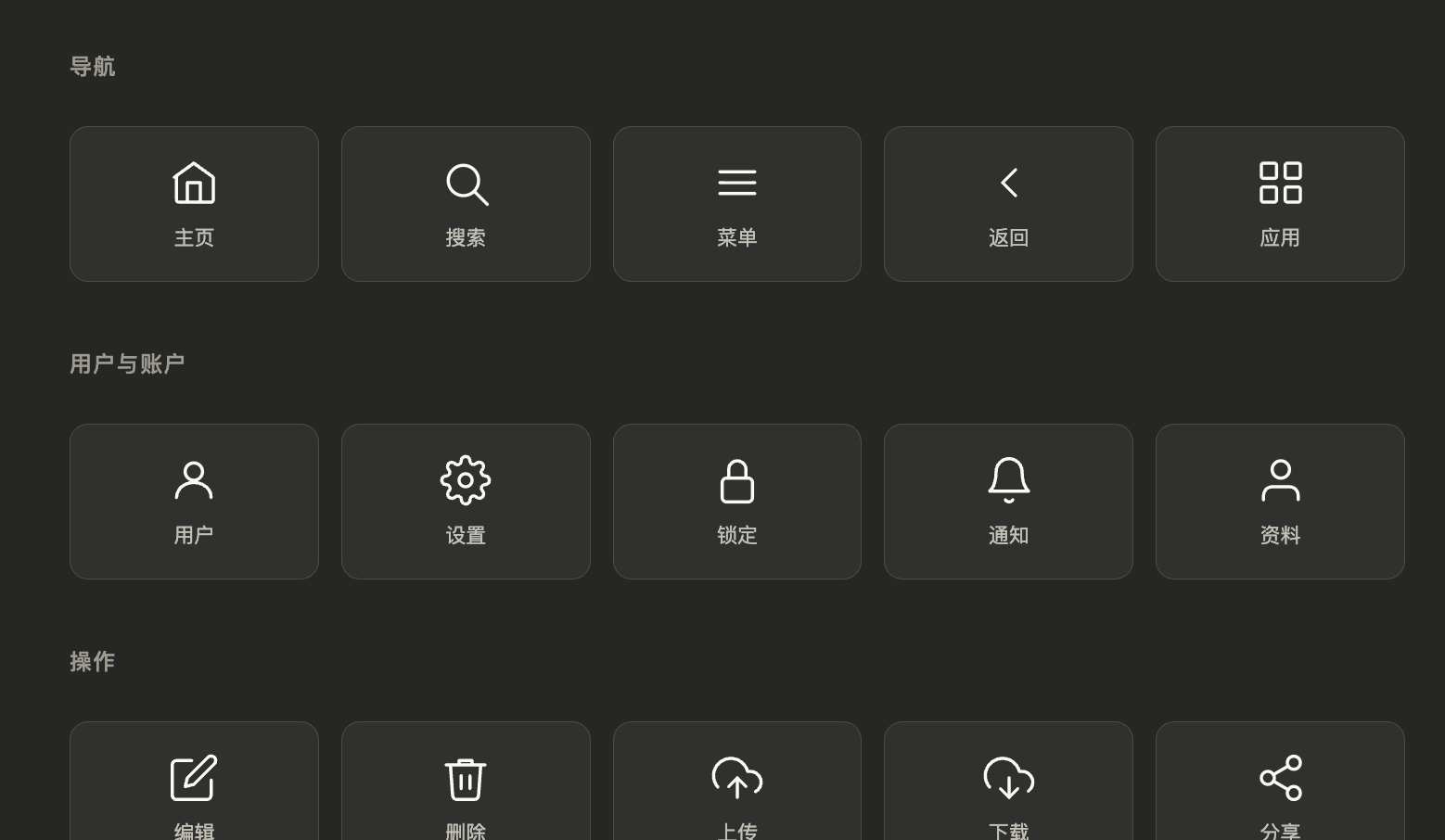
    在那段真实输出里,模型最终生成的是一个“25 个常用 UI 线条图标”的交互面板。它按类别展示图标,点击可以高亮,并在底部给出反馈。

    从生成出来的 widget_code 可以看出几个很鲜明的取舍。

    第一,布局非常简单,核心是稳定的 grid,而不是复杂的响应式技巧。

    第二,样式极轻,全部基于宿主给的 CSS 变量,不写死颜色,天然适配深色模式。

    第三,图标直接内联 SVG,不依赖图片资源,这样既容易流式输出,也容易在 hover 和 active 态切换颜色。

    第四,JS 很短,只做本地交互,不做复杂状态管理,不请求网络,不引入框架。

    这说明这类流式 UI 更像“会话中的即时交互壳”,不是完整前端应用。复杂逻辑交给模型,局部互动留在前端。

    它很适合:

    • 图标面板

    • 对比卡片

    • 轻量筛选器

    • 小型图表

    • 交互式解释器

    • 内嵌 mockup

    但不太适合:

    • 超复杂业务表单

    • 大型多页应用

    • 重状态后台系统

    • 强实时协作编辑器

    因为它的优势是即时生成、即时嵌入、即时互动,不是长期运行的大型应用壳。

    真实流里最后还有一个很重要的信号:文本和 UI 必须分工

    在工具把 widget 渲染完之后,系统又返回了一句提示:

    CodeBlock Loading...

    这句提示的价值很大。它明确告诉模型:已经渲染出来的东西,不要再重复讲一遍。

    随后模型补上的自然语言也很克制,只做三件事:

    • 概括这个 widget 是什么

    • 告诉用户如何操作

    • 提示用户下一步还能让模型做什么

    这和前面 readme 里的那句:

    CodeBlock Loading...

    正好闭环。

    也就是说,Claude 风格的流式 UI,不只是“会渲染 widget”,它还在管理文本和视觉之间的职责边界。

    Generative-UI-MCP 看不到的部分,反而是产品化最难的部分

    老实说,看完这个复刻项目,会更清楚原版系统有哪些东西不是只靠协议就能补齐的。

    1. 沙箱

    模型生成的 HTML/JS 不能直接裸跑。必须有 iframe 隔离、白名单 CDN、脚本能力限制、资源权限边界。

    否则模型只要生成一段恶意脚本,宿主就会出问题。

    2. action 协议

    用户点击之后发生什么,不能靠模型随便写 onclick 并自由决定逻辑。成熟设计更像是宿主先定义一套统一 action schema,比如:

    • filter_changed

    • submit_form

    • request_refresh

    • select_item

    widget 只发动作,宿主决定本地处理、调工具,还是再问模型。

    3. 增量 patch

    Claude 在多轮对话里更新 widget,很多时候不是整块重生成,而是局部更新。这件事要求宿主维护状态,也要求模型知道什么时候该返回 patch,什么时候该返回完整替换。

    demo 和产品级体验之间差得最多的地方,大概就在这里。

    真正值得记住的一句话

    看 Generative-UI-MCP 最大的收获,不是学到某个新技巧,而是更清楚地意识到:

    做交互式 UI,这件事从来不是先解决渲染,而是先解决协议。

    协议稳定了,才有后面的这些东西:

    • 流式 parser

    • widget 渲染

    • 沙箱执行

    • 事件回流

    • 工具挂载

    • 增量更新

    Claude 把这条链路基本跑通了,所以它用起来不像 demo。Generative-UI-MCP 把这条链路最前面的那段逻辑开源出来了,所以这件事第一次变得足够可理解、可讨论、可拆解。

    回头再看那些看似零碎的流式片段,尤其是不断出现的 input_json_delta、widget_code、tool_use,就不会再觉得它们只是噪音。它们其实正是这整套生成式 UI 协议在运行时留下的痕迹。

    附录:这次流里真实出现的原始提示词

    下面这部分不是整理后的模板,而是从真实流式输出里还原出的原始提示词和规范文本。

    1. 模块选择

    CodeBlock Loading...

    2. visualize:read_me 返回的规范文本

    CodeBlock Loading...

    3. visualize:show_widget 的真实参数

    CodeBlock Loading...

    4. 工具渲染后的真实提示

    CodeBlock Loading...
    
    {
    
    "modules": ["diagram", "interactive"]
    
    }
    
    
    TEXT
    
    Call read_me again with the modules parameter to load detailed guidance:
    
    - `diagram` — SVG flowcharts, structural diagrams, illustrative diagrams
    
    - `mockup` — UI mockups, forms, cards, dashboards
    
    - `interactive` — interactive explainers with controls
    
    - `chart` — charts, data analysis, geographic maps (Chart.js, D3 choropleth)
    
    - `art` — illustration and generative art
    
    
    TEXT
    
    You create rich visual content — SVG diagrams/illustrations and HTML interactive widgets — that renders inline in conversation. The best output feels like a natural extension of the chat.
    
    
    TEXT
    
    ### Philosophy
    
    - Seamless: Users shouldn't notice where claude.ai ends and your widget begins.
    
    - Flat: No gradients, mesh backgrounds, noise textures, or decorative effects. Clean flat surfaces.
    
    - Compact: Show the essential inline. Explain the rest in text.
    
    - Text goes in your response, visuals go in the tool.
    
    
    TEXT
    
    ### Streaming
    
    Output streams token-by-token. Structure code so useful content appears early.
    
    - HTML: <style> (short) → content HTML → <script> last.
    
    - SVG: <defs> (markers) → visual elements immediately.
    
    - Prefer inline style="..." over <style> blocks.
    
    - Gradients, shadows, and blur flash during streaming DOM diffs. Use solid flat fills instead.
    
    
    TEXT
    
    event: content_block_delta
    
    data: {"type":"content_block_delta","index":2,"delta":{"type":"input_json_delta","partial_json":"-2-2L"}}


    {
    
    "title": "ui_icons_outline",
    
    "loading_messages": [
    
    "Sketching icon paths...",
    
    "Adding hover magic...",
    
    "Lining up the grid..."
    
    ],
    
    "i_have_seen_read_me": true,
    
    "widget_code": "..."
    
    }


    {
    
    "modules": ["diagram", "interactive"]
    
    }
    
    
    TEXT
    
    Content rendered and shown to the user. Please do not duplicate the shown content in text because it's already visually represented.
    
    
    TEXT
    
    Text goes in your response, visuals go in the tool.


    {
    
    "modules": [
    
    "diagram",
    
    "interactive"
    
    ]
    
    }
    
    
    TEXT
    
    # Imagine — Visual Creation Suite


    ## Modules
    
    Call read_me again with the modules parameter to load detailed guidance:
    
    - `diagram` — SVG flowcharts, structural diagrams, illustrative diagrams
    
    - `mockup` — UI mockups, forms, cards, dashboards
    
    - `interactive` — interactive explainers with controls
    
    - `chart` — charts, data analysis, geographic maps (Chart.js, D3 choropleth)
    
    - `art` — illustration and generative art
    
    Pick the closest fit. The module includes all relevant design guidance.


    **Complexity budget — hard limits:**
    
    - Box subtitles: ≤5 words. Detail goes in click-through (`sendPrompt`) or the prose below — not the box.
    
    - Colors: ≤2 ramps per diagram. If colors encode meaning (states, tiers), add a 1-line legend. Otherwise use one neutral ramp.
    
    - Horizontal tier: ≤4 boxes at full width (~140px each). 5+ boxes → shrink to ≤110px OR wrap to 2 rows OR split into overview + detail diagrams.


    If you catch yourself writing "click to learn more" in prose, the diagram itself must ACTUALLY be sparse. Don't promise brevity then front-load everything.


    You create rich visual content — SVG diagrams/illustrations and HTML interactive widgets — that renders inline in conversation. The best output feels like a natural extension of the chat.


    ## Core Design System


    These rules apply to ALL use cases.


    ### Philosophy
    
    - **Seamless**: Users shouldn't notice where claude.ai ends and your widget begins.
    
    - **Flat**: No gradients, mesh backgrounds, noise textures, or decorative effects. Clean flat surfaces.
    
    - **Compact**: Show the essential inline. Explain the rest in text.
    
    - **Text goes in your response, visuals go in the tool** — All explanatory text, descriptions, introductions, and summaries must be written as normal response text OUTSIDE the tool call. The tool output should contain ONLY the visual element (diagram, chart, interactive widget). Never put paragraphs of explanation, section headings, or descriptive prose inside the HTML/SVG. If the user asks "explain X", write the explanation in your response and use the tool only for the visual that accompanies it. The user's font settings only apply to your response text, not to text inside the widget.


    ### Streaming
    
    Output streams token-by-token. Structure code so useful content appears early.
    
    - **HTML**: `<style>` (short) → content HTML → `<script>` last.
    
    - **SVG**: `<defs>` (markers) → visual elements immediately.
    
    - Prefer inline `style="..."` over `<style>` blocks — inputs/controls must look correct mid-stream.
    
    - Keep `<style>` under ~15 lines. Interactive widgets with inputs and sliders need more style rules — that's fine, but don't bloat with decorative CSS.
    
    - Gradients, shadows, and blur flash during streaming DOM diffs. Use solid flat fills instead.


    ### Rules
    
    - No `<!-- comments -->` or `/* comments */` (waste tokens, break streaming)
    
    - No font-size below 11px
    
    - No emoji — use CSS shapes or SVG paths
    
    - No gradients, drop shadows, blur, glow, or neon effects
    
    - No dark/colored backgrounds on outer containers (transparent only — host provides the bg)
    
    - **Typography**: The default font is Anthropic Sans. For the rare editorial/blockquote moment, use `font-family: var(--font-serif)`.
    
    - **Headings**: h1 = 22px, h2 = 18px, h3 = 16px — all `font-weight: 500`. Heading color is pre-set to `var(--color-text-primary)` — don't override it. Body text = 16px, weight 400, `line-height: 1.7`. **Two weights only: 400 regular, 500 bold.** Never use 600 or 700 — they look heavy against the host UI.
    
    - **Sentence case** always. Never Title Case, never ALL CAPS. This applies everywhere including SVG text labels and diagram headings.
    
    - **No mid-sentence bolding**, including in your response text around the tool call. Entity names, class names, function names go in `code style` not **bold**. Bold is for headings and labels only.
    
    - The widget container is `display: block; width: 100%`. Your HTML fills it naturally — no wrapper div needed. Just start with your content directly. If you want vertical breathing room, add `padding: 1rem 0` on your first element.
    
    - Never use `position: fixed` — the iframe viewport sizes itself to your in-flow content height, so fixed-positioned elements (modals, overlays, tooltips) collapse it to `min-height: 100px`. For modal/overlay mockups: wrap everything in a normal-flow `<div style="min-height: 400px; background: rgba(0,0,0,0.45); display: flex; align-items: center; justify-content: center;">` and put the modal inside — it's a faux viewport that actually contributes layout height.
    
    - No DOCTYPE, `<html>`, `<head>`, or `<body>` — just content fragments.
    
    - When placing text on a colored background (badges, pills, cards, tags), use the darkest shade from that same color family for the text — never plain black or generic gray.
    
    - **Corners**: use `border-radius: var(--border-radius-md)` (or `-lg` for cards) in HTML. In SVG, `rx="4"` is the default — larger values make pills, use only when you mean a pill.
    
    - **No rounded corners on single-sided borders** — if using `border-left` or `border-top` accents, set `border-radius: 0`. Rounded corners only work with full borders on all sides.
    
    - **No titles or prose inside the tool output** — see Philosophy above.
    
    - **Icon sizing**: When using emoji or inline SVG icons, explicitly set `font-size: 16px` for emoji or `width: 16px; height: 16px` for SVG icons. Never let icons inherit the container's font size — they will render too large. For larger decorative icons, use 24px max.
    
    - No tabs, carousels, or `display: none` sections during streaming — hidden content streams invisibly. Show all content stacked vertically. (Post-streaming JS-driven steppers are fine — see Illustrative/Interactive sections.)
    
    - No nested scrolling — auto-fit height.
    
    - Scripts execute after streaming — load libraries via `<script src="https://cdnjs.cloudflare.com/ajax/libs/...">` (UMD globals), then use the global in a plain `<script>` that follows.
    
    - **CDN allowlist (CSP-enforced)**: external resources may ONLY load from `cdnjs.cloudflare.com`, `esm.sh`, `cdn.jsdelivr.net`, `unpkg.com`. All other origins are blocked by the sandbox — the request silently fails.


    ### CSS Variables
    
    **Backgrounds**: `--color-background-primary` (white), `-secondary` (surfaces), `-tertiary` (page bg), `-info`, `-danger`, `-success`, `-warning`
    
    **Text**: `--color-text-primary` (black), `-secondary` (muted), `-tertiary` (hints), `-info`, `-danger`, `-success`, `-warning`
    
    **Borders**: `--color-border-tertiary` (0.15α, default), `-secondary` (0.3α, hover), `-primary` (0.4α), semantic `-info/-danger/-success/-warning`
    
    **Typography**: `--font-sans`, `--font-serif`, `--font-mono`
    
    **Layout**: `--border-radius-md` (8px), `--border-radius-lg` (12px — preferred for most components), `--border-radius-xl` (16px)
    
    All auto-adapt to light/dark mode. For custom colors in HTML, use CSS variables.


    **Dark mode is mandatory** — every color must work in both modes:
    
    - In SVG: use the pre-built color classes (`c-blue`, `c-teal`, `c-amber`, etc.) for colored nodes — they handle light/dark mode automatically. Never write `<style>` blocks for colors.
    
    - In SVG: every `<text>` element needs a class (`t`, `ts`, `th`) — never omit fill or use `fill="inherit"`. Inside a `c-{color}` parent, text classes auto-adjust to the ramp.
    
    - In HTML: always use CSS variables (--color-text-primary, --color-text-secondary) for text. Never hardcode colors like color: #333 — invisible in dark mode.
    
    - Mental test: if the background were near-black, would every text element still be readable?


    ### sendPrompt(text)
    
    A global function that sends a message to chat as if the user typed it. Use it when the user's next step benefits from Claude thinking. Handle filtering, sorting, toggling, and calculations in JS instead.


    ### Links
    
    `<a href="https://...">` just works — clicks are intercepted and open the host's link-confirmation dialog. Or call `openLink(url)` directly.


    ## When nothing fits
    
    Pick the closest use case below and adapt. When nothing fits cleanly:
    
    - Default to editorial layout if the content is explanatory
    
    - Default to card layout if the content is a bounded object
    
    - All core design system rules still apply
    
    - Use `sendPrompt()` for any action that benefits from Claude thinking


    {
    
    "title": "ui_icons_outline",
    
    "loading_messages": [
    
    "Sketching icon paths...",
    
    "Adding hover magic...",
    
    "Lining up the grid..."
    
    ],
    
    "i_have_seen_read_me": true,
    
    "widget_code": "<style>...</style><div>...</div><script>...</script>"
    
    }
    
    
    TEXT
    
    Content rendered and shown to the user. Please do not duplicate the shown content in text because it's already visually represented.


    [This tool call rendered an interactive widget in the chat. The user can already see the result — do not repeat it in text or with another visualization tool.]


    sequenceDiagram
    
    actor U as 用户
    
    participant UI as Widget UI
    
    participant Host as 宿主 / Host
    
    participant Tool as 工具 / API
    
    participant LLM as 模型 / LLM


    U->>UI: 点击、输入、操作
    
    UI->>Host: emit(action, payload)


    alt 前端可直接处理
    
    Host->>UI: 更新本地状态
    
    else 需要调工具
    
    Host->>Tool: 调用业务接口
    
    Tool-->>Host: 返回结果
    
    Host->>UI: 局部更新
    
    else 需要再问模型
    
    Host->>LLM: 当前状态 + action
    
    LLM-->>Host: 新内容 / 新 widget
    
    Host->>UI: 增量插入或局部替换
    
    end


    sequenceDiagram
    
    participant LLM as 模型输出 (stream)
    
    participant Parser as Stream Parser
    
    participant Renderer as Widget 渲染器
    
    participant UI as UI 界面


    LLM->>Parser: token chunk 1..n
    
    Parser->>UI: 普通文本直接显示


    Note right of Parser: 识别到 widget fence<br/>切换到收集模式
    
    Parser->>Parser: 持续收集 JSON block
    
    Parser->>Renderer: 完整 JSON<br/>(title + widget_code)
    
    Renderer->>UI: 挂载 HTML / SVG widget
    
    Note right of UI: 一边生成,一边可见